
SpeakEZ

CASE STUDY
A cutting-edge app compatible with Apple Vision Pro that allows you to practice your public speaking in a virtual environment
SKILLS: Figma, HTML, CSS, Canva
DATE: Fall 2024
OVERVIEW
SpeakEZ was a semester-long project for my New Media Capstone class. The five other students in my team and I were tasked with creating an app for the Apple Vision Pro. We decided to make an app for students and professionals to practice and receive feedback on their public speaking in a virtual environment.
My role for this project was Lead Web Developer and Lead UX Designer. My primary responsibilities involved creating a full wireframe for our application and creating a website to house all our project information.
MASTERING
THE PROCESS
The Challenge
The most challenging phase of this project for our team was establishing our initial idea. Because the Apple Vision Pro is a relatively new product, fewer resources were available for creating applications for the device. Because of this, it was difficult to grasp the scope of what we could accomplish with our capabilities. We wanted to challenge ourselves but didn’t want to risk taking on more than we could handle. Although there were members of my group who had worked with Xcode before, coding for the Apple Vision Pro was a whole different ball game.
Similarly, the challenge I faced in my role as the Lead UX Designer was creating a wireframe for an Apple Vision Pro application, in contrast to a regular app or website. Again, it was the lack of resources for creating wireframes for the Apple Vision Pro that made this difficult.
As the Lead Web Developer, I coordinated with our design team to implement our visual design guide. Working across teams was difficult in this case because I could not get some of the elements of the website done until the design team finished their part. Because of this, I had less time to finish my part of the checkpoint.
The Solution
After a few weeks of drafting ideas, we concluded that a productivity app would be an application that we could reasonably create. We drew inspiration from Apple’s Keynote, which is compatible with the Apple Vision Pro and allows the user to practice a slideshow presentation in a virtual environment. However, we recognized after using the App on the Apple Vision Pro that some of the instructions for how to use the app were relatively unclear. Furthermore, we noted that Apple’s Keynote lacked feedback capabilities for the user’s performance after practicing their presentation. We discovered an app called Orai for Public Speaking that had these feedback capabilities but was not compatible with Apple Vision Pro. Therefore, we decided to create an app that combined the abilities of both apps, while also expanding their functionality.
The SpeakEZ app offers two 360-degree virtual environments to practice your public speaking, an empty lecture hall and a populated lecture hall, with realistic footage taken from a 360-degree camera. SpeakEZ also has practical tools like a timer and notes to record key points. After the timer stops, the app provides the user with feedback such as a recorded playback of your speech and a filler-word count.
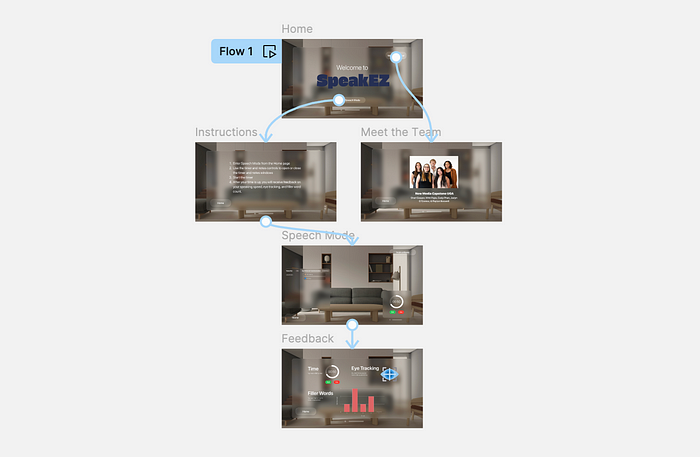
As the lead UX Designer, I created a full wireframe for our app using Figma and Apple’s visionOS UI Kit, which contains a variety of components, text styles, and materials to create a visionOS app design. Our app is relatively simple and has one core flow. From the home screen, the user can open up the instructions page, from which speech mode can be accessed which contains the timer and notes tools. Once the timer runs out, the user will enter feedback mode. Although some of the app functions differed in our final version of the app, the wireframe was the technical and creative backbone for the back-end work of the project.
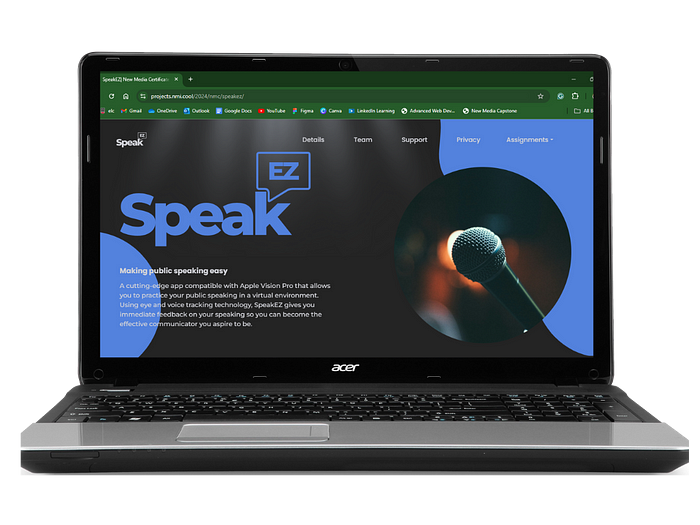
During the phase of the project where I had to create the project website, our team learned how to communicate effectively to make sure that we could each finish our portion of the project in time. I coordinated with the design team rigorously until we agreed on our brand colors, logo colors, and other design elements. I expanded on a template for our website using HTML and CSS to translate our design elements into a cohesive web experience. When I was struggling with a portion of the website, I would communicate with my project manager so we could work it out together.
THE RESULTS
This project gave me valuable experience working with a team on a long-term project. I was able to improve my communication and teamwork skills drastically by working across smaller teams within our group. Practically, I was able to exercise my wireframing skills with Figma outside the bounds of a standard app for an iOS device. Furthermore, I got to expand my HTML and CSS skills even more in creating the project website.
The SpeakEZ app is available on the App Store and can be used with any Apple Vision Pro device.